- Tucson Mayor and City Council Meetings July 21, 2026 (YouTube): Tucson Police Chief Monica Prieto begins her presentation at around 1:34:47. In the clip of Ward 6 Council Member Miranda Schubert, she is asking questions on behalf of Vice Mayor and Ward 1 Council Member Lane Santa Cruz.
- Mayor and Council Meeting Agendas & Legal Action Reports (Summaries)
- Tucson Mayor and City Council Meetings (YouTube)
Video Links: Let’s go to Tucson City Council!
- Safe City Initiative Update – Public Drug Use Enforcement and Pathways
to Treatment with Kate K. Vesely, Director, Pima County Justice Services
Department (City Wide): Click on item number 4, labeled “Safe City Initiative Update – Public Drug Use Enforcement and Pathways to Treatment with Kate K. Vesely, Director, Pima County Justice Services Department (City Wide) Memorandum: SS/JUL21-26-151”, then click “MAYOR AND COUNCIL MEMORANDUM: SS/JUL21-26-151” in the “Supporting Documents” section. - New Tucson police program would target 50 people most often convicted of low-level crimes (AZ Luminaria)
Rooftop Meshtastic node install
I installed a solar-powered rooftop Meshtastic node on the roof of my home along with my partner and a friend. Hanging out and learning together is the best part of what this, or any technology can build.
This post was originally a place to host images for an Etherpad to coordinate this install event, but I’m trying to update this post with my thoughts on this technology and the install process in general.
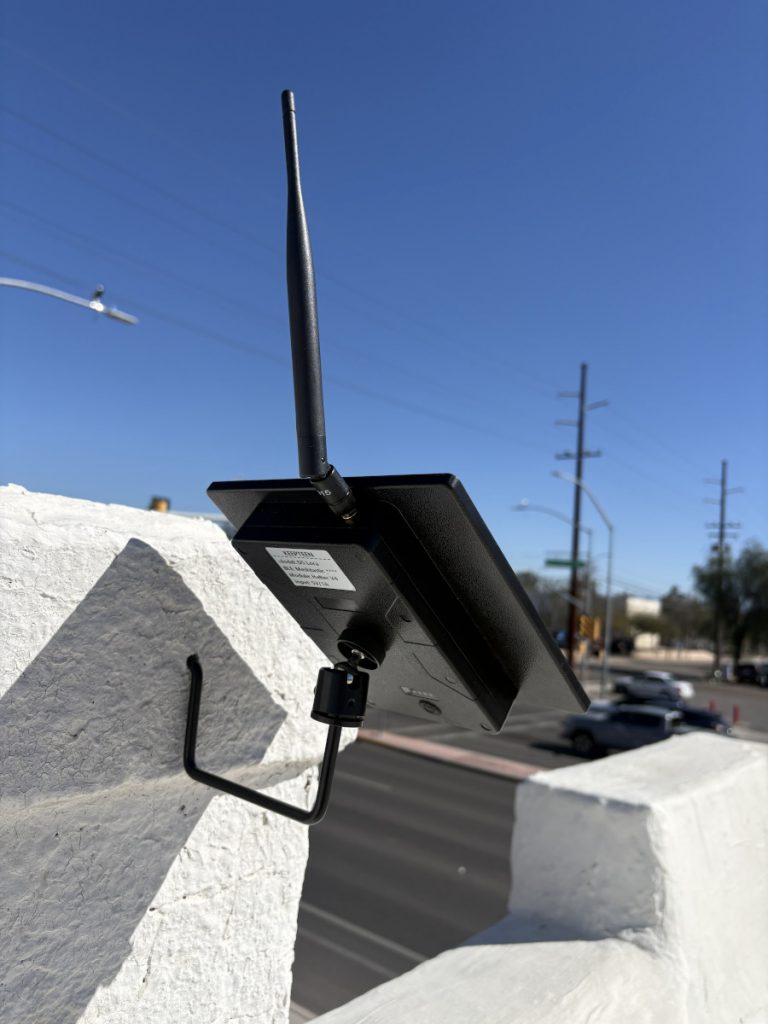
Over the last year, a technology called Meshtastic started popping up on my social media feeds. The technology uses relatively low-cost radios to send encrypted messages and location data over a portion of the radio spectrum that doesn’t require a license.
A friend gave me a mobile device, and while I could see messages come through on the public channel that, in my area, people use primarily for testing, I lived too far from anyone else I knew with a radio to chat with them.
If I wanted to do more with this technology, I needed to install a rooftop node that could better hear signals from other nodes.
So what?
Meshtastic devices enable sending encrypted text messages. This is somewhat limited compared with the multimedia messages and internet access widely available through most smart phones. And it’s even more limited than the voice communication possible through two-way radios. So why bother learning and trying to deploy this technology?
Autonomy. Does anyone really love their cell phone carrier? What if the owners of these networks or the government decides to limit access or intensely surveil these networks? What if there is a disaster that causes an outage that the network owners are not able to quickly repair? Building community-controlled communications networks is a step in direction of giving us more autonomy in these scenarios. I’m ambivalent about whether Meshtastic or other LoRA-based technologies are particularly useful or the best technology to pursue. However, devices are relatively inexpensive and the technical, and more importantly, the human, considerations for getting Meshtastic radios to effectively talk with one another are similar to building any other kinds of wireless networks. So, they represent a good entry point into building autonomous communication networks.
Simplicity. Smartphones and the internet provide broad capabilities, but can also have detrimental effects on mental health and attention. Does simpler messaging with friends and neighbors help us reconsider the ways we engage with other technologies?
Connections between friends and neighbors. There are many ways to build connections between people. For me, I like to do projects with other people. As a renter, I’m not going to be building an ADU, or even a shed. Building radio networks taps into the time-honored tradition of friends and neighbors helping one another create infrastructure. Coming together to build these networks gets us in the habit of mutual aid and working together in ways that can help to respond to other kinds of crisis.
Meshraising
I decided to put this on my roof taking an approach called “meshraising” that’s being developed by Tucson Mesh, a group that has build a community-powered mesh WiFi network to provide free or low-cost internet access. Someone who wants to get connected gathers a group of interested neighbors and along with more experienced facilitators, they test line of sight and signal strength, install the hardware on the roof, crimp cables and learn about the technology. At the same time, some neighbors may meet each other for the first time through a shared project.
Following this model, but with much less planning and coordination, I invited some friends who had expressed interest over to do the install of the Meshtastic node.
The plan was to divide the tasks into groups that could be split up between a number of teams if a lot of people showed up. Ultimately, only one friend was able to make it by the time I scheduled the event, but it was more fun than if I had just done it by myself. We ended up doing doing all the tasks together, but having the tasks planned out was helpful.
The roof. Figure out where and how to best mount the node and construct any kind of mast or bracket. Once the node has been configured, attach the node to the mounting bracket and angle the node so the solar panels can provide the maximum charge.
Configuration. Configure the Meshtastic node so it can connect to other nodes in the city. For this install I used the settings suggested by the Arizona Meshtastic Community.
Testing. Get a baseline of how far two mobile nodes can message each other. Once the node is installed, see how the messaging range of the mobile nodes improves with a rooftop node nearby to relay messages.
I made a template for the doc I shared to invite people to help install the node here.
The device
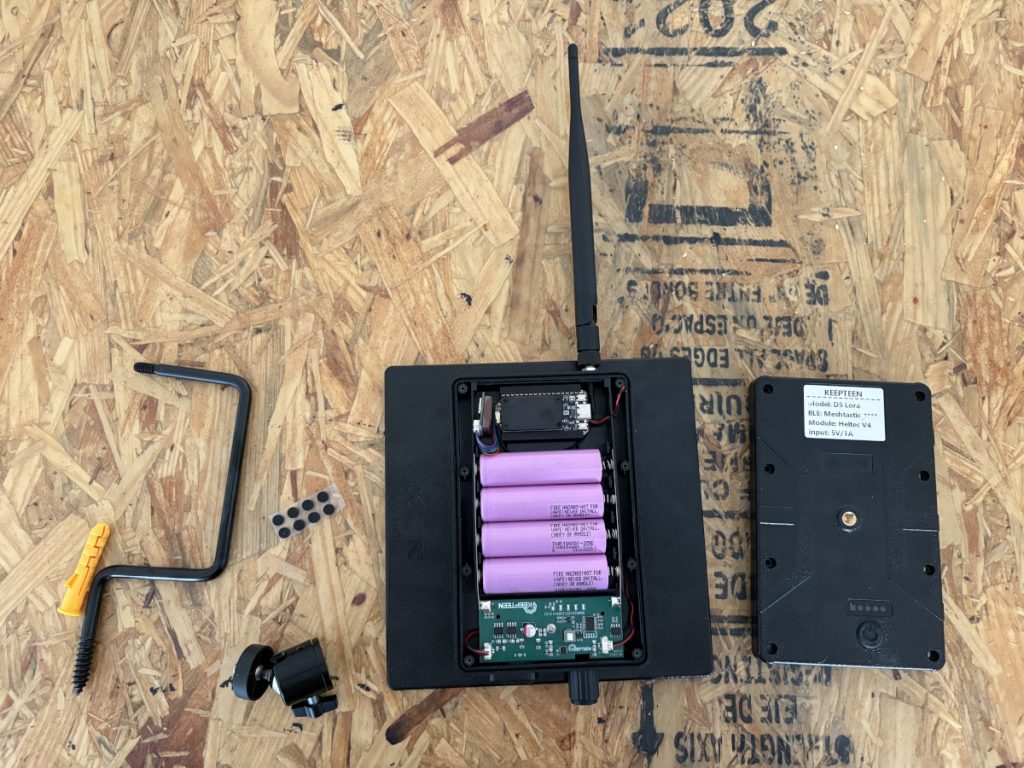
I bought a device off of Ali Express that combines the Heltec v4 board that includes a microcontroller and the LoRa radio with a solar panel, enclosure, external antenna, battery holder and power controller. It comes with some basic mounting hardware.
It’s pretty similar to this enclosure sold by Heltec.
Mounting the node
I originally wanted to use a mast to get some additional height, but ultimately figuring out how to mount this when I didn’t want to buy a non-penatrating roof mount or do too much screwing into the side of the house was too difficult.
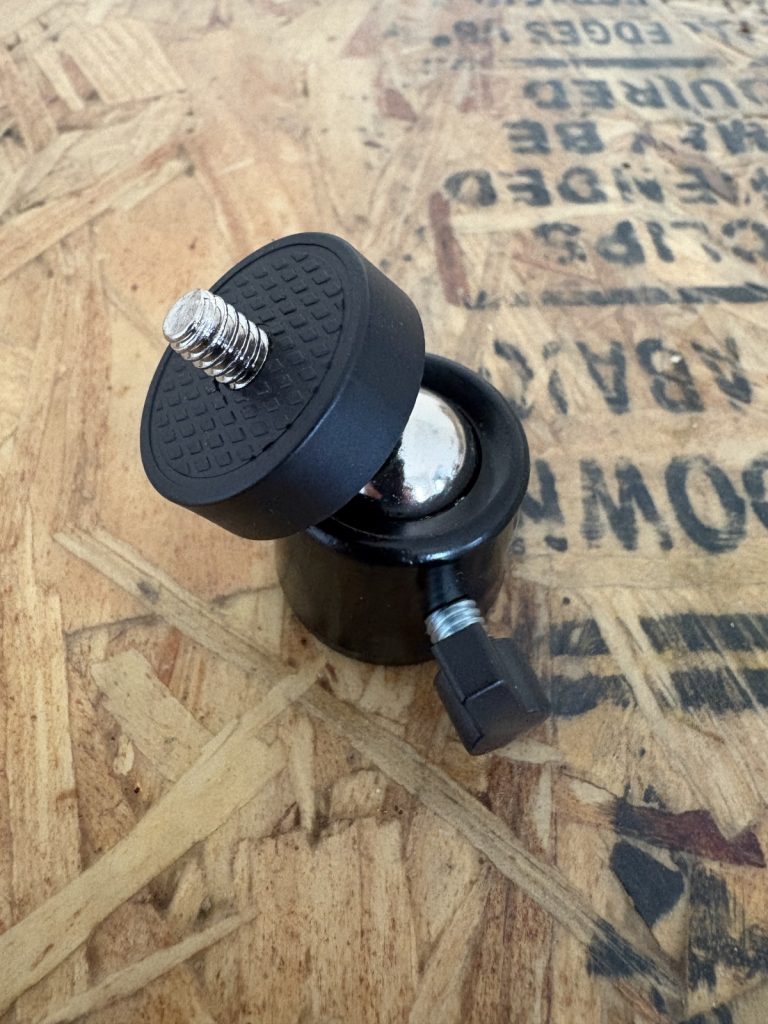
One mast idea was just a poll and somehow mounting the node at the top using the connector that came with the kit.
The screw on either side of the mount is probably 1/4-20 UNC because it screwed onto my tripod.
Some inspiration:
- Just put antenna mast into vent like this design.
- This DIY mast uses “1 inch outer diameter non-conductive electrical conduit in a 10 foot length”.
- This build has a cool 3D-printed connector. That won’t work for this type of node, but it’s good inspiration for thinking about different ways to mount the node to a mast.
- This mast you can buy says “manufacturers recommend that mast heights of 10 feet and higher be guyed,” so sticking to 6’ or under seems smart.
This is the only vent that is long enough to consider mounting a mast to. Unfortunately, when I jiggled it, I don’t think it’s sturdy enough.
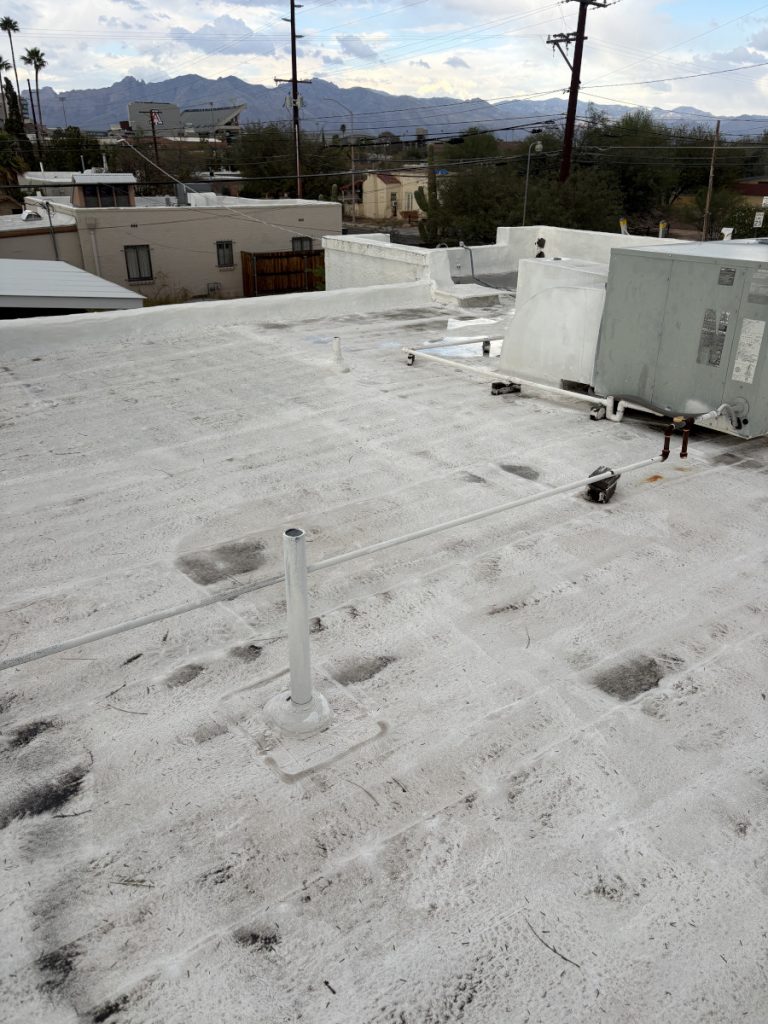
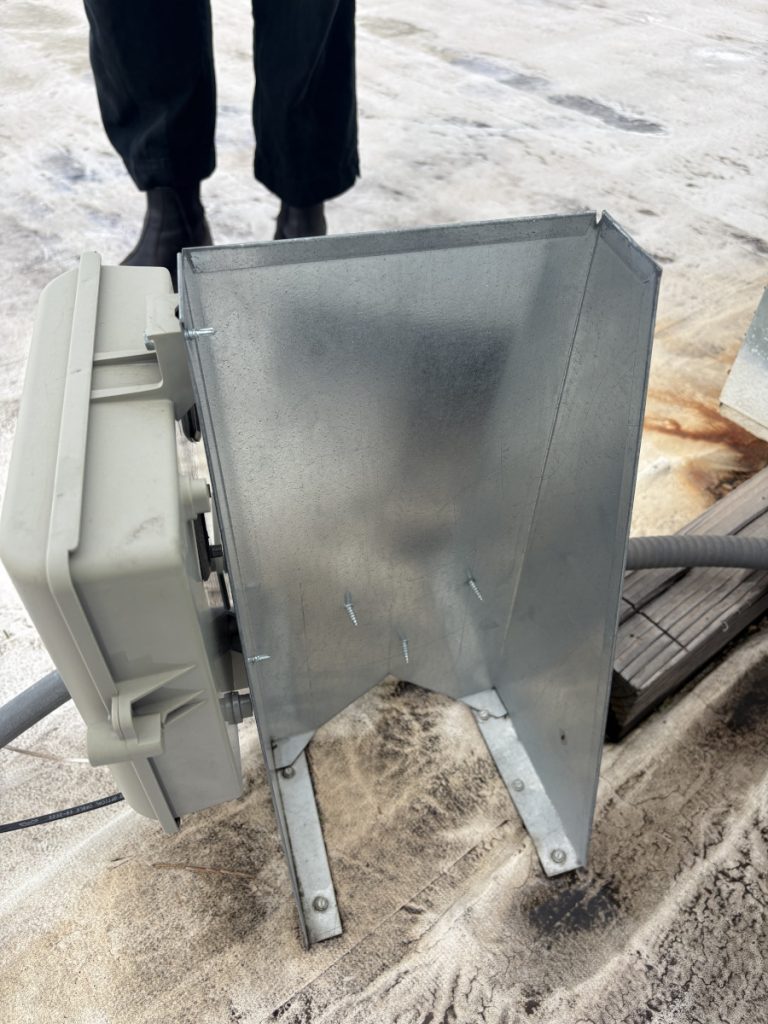
I could also try mounting a mast with U brackets to this plate, where a telecom box and power to the AC unit are routed.
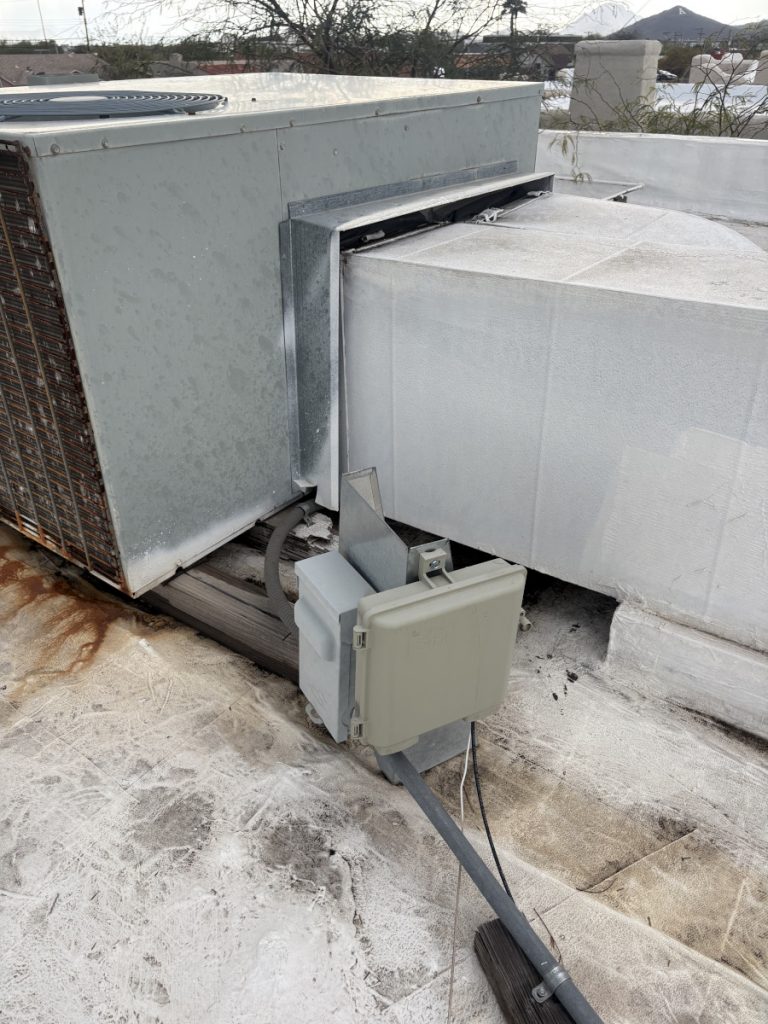
Here’s the back of the plate. Avoiding the box for the AC might be tricky when mounting on the sturdiest face:
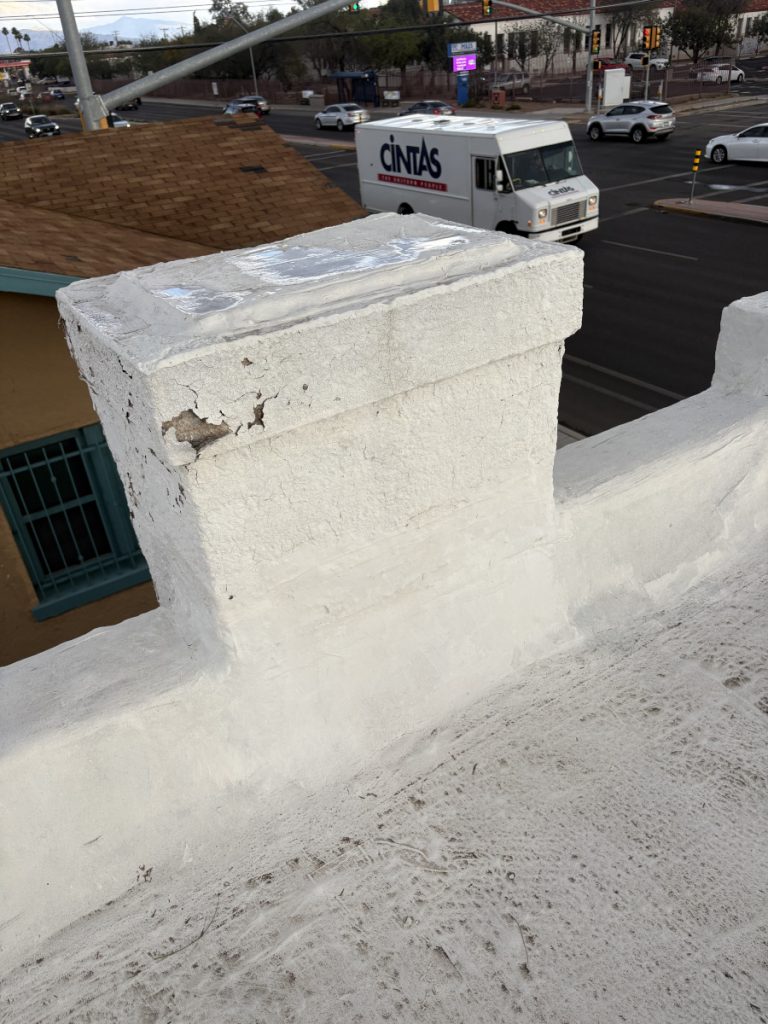
I think the best bet will be to just screw the mount that comes with the kit into this chimney, the highest point around the edge of the roof.
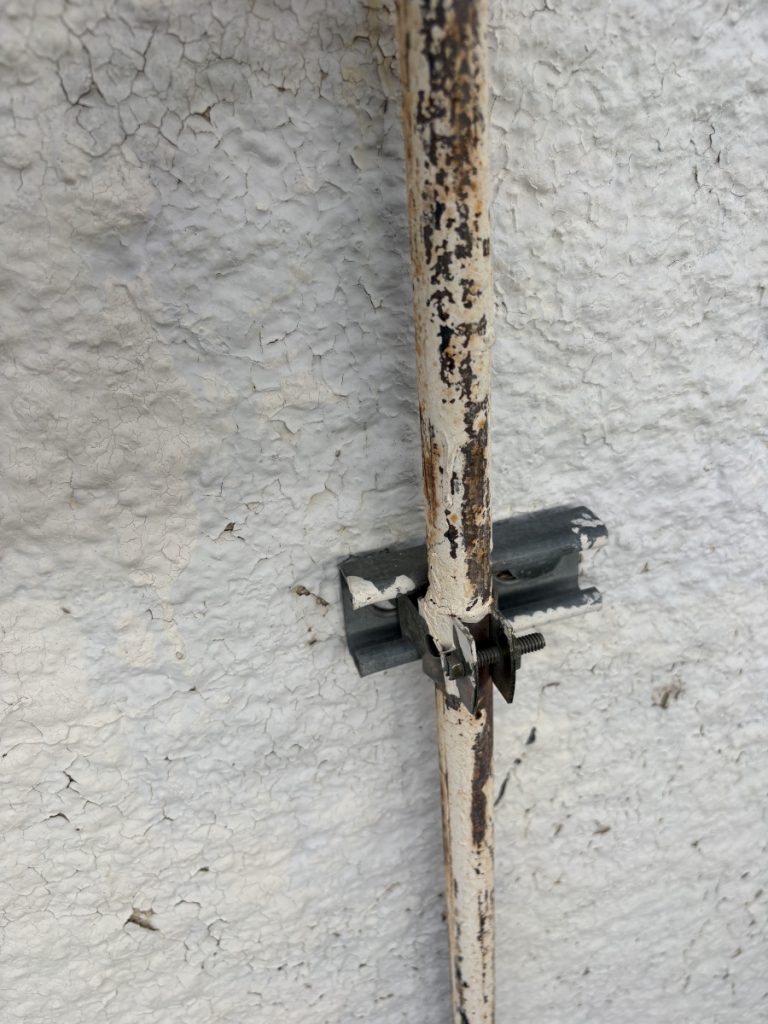
The brackets used to hold the gas line to one side of the house might be a good part to try to find if I ever do end up installing a mast.
Success!
We got the node up. We took a walk with mobile radio and could DM the rooftop node from at least a half mile away, though it had trouble when we stood next to taller buildings.
I definitely started seeing more messages on the primary channel on my mobile node with the installation of the rooftop node.
“You say words I wish to hold and bold and underline.”
I’ve never been one to focus on the passage of time, though this is almost certainly a defense mechanism to avoid reckoning with the reality that we are all living in some finite time. The COVID-19 pandemic confounds my ability to ignore time, even though time was fuzzy. Was it almost three years ago that I had a great time seeing old friends and colleagues at a conference in New Orleans before getting an email on the train ride back that there were confirmed cases of a virus that few had been paying much attention to at the conference and diving immediately into quarantine, a few weeks before the city where I was living shut down (for some) in ways that were complicated and unequal? How many months was it into the pandemic when I watched young people march down South Side streets lined by a phalanx of police? How do you talk about something that is different, that is no longer novel but is often not passed?
I’m not entirely how much I’ve changed as a result of the pandemic, or how much of that change is moving to a new city, changing jobs twice or just the passage of time, period. The last few years have been ones of tremendous, sometimes brutal, sometimes transformational change in many people’s lives. I don’t really know how profound that has been for me, but one of the more intimate and recognizable changes was that I really started listening to music again.
Listening to music had always brought a pang of anxiety about how I wasn’t seriously making it myself. While I know the pandemic was a creatively generative space, for me, it brought permission to really pay attention to music for the pleasure of it, or to try to feel something when the whole world felt like it was oscillating between emotional acuity and the absence of it or to just try to understand the world I was living so strangely in.
As we collectively learned more about the virus, live shows felt like a space where there was a real and careful conversation about how to balance the need for communion, the economic needs of artists and people who’s livelihoods are connected to them and everyone’s safety, and at least in some spaces, some concrete examples of putting that balance of concerns into practice. Before I moved away from Chicago, I want to a couple of really amazing generator shows. I hope they’ll continue to happen after the spring thaw. In Phoenix, I watched as young people (you can tell because , despite Arizona’s “wild west” mythology and the decades-long attempts to erode regulation in many sectors, at music venues, those under drinking age must be separated from older audience members by a physical barrier) danced as a band played, seemingly uninhibited by wearing masks. It felt like such a failure of public health messaging that this simultaneous exercise of abandon and care was not the center of how people were living during the pandemic and that maintaining even the modest level of concern over the pandemic was somehow living in the depths of privation.
Which is all to say that listening to music, and seeing it performed has been something that has brought me a lot of joy in a time of great change. That’s the context for the place in which I find myself listening to a lot of music and these are some of the random things I’ve been listening at the turning of the year. The list of songs and bands begins with a show I didn’t go to and ends with one I did.
Stuck played in Phoenix in the not so distant past. I didn’t go, but their latest EP, “Content That Makes You Feel Good” resonates with some of the fatigue I’ve felt, and that I’ve heard so many others articulate.
One song, “City of Police” vividly reflects the police response to protests calling for an end to police violence and for racial justice that I witnessed in Chicago (Stucks’s hometown) in 2020:
Protecting the protectors,
answering to no one,
they’re kettling in
those pushed to the fringes
when their march of reforms
meets their upturned drawbridges.
I know there’s a fear hiding behind all that rage,
you can see it in their eyes.
I’ve always liked hearing music because it’s just around, and Tik-Tok’s pairing of images and songs makes music ubiquitous in a way that generates meaning that feels more like a sample or a karaoke interpretation than top 40 radio. This is all to say that “Anti-Hero” and its very relatable chorus has been stuck in my head for weeks. I really love how the cadence of the first half of the verse and the second half shifts. And you know a song has some fundamental quality when it lends itself to mashups like with this radio ska classic.
Thinking more about music that feels ubiquitous, when I lived on the Northwest Side of Chicago, I would often hear music in Spanish blaring from garages throughout the alleys in my neighborhood. It was so common, that I was eventually able to recognize the occasional Los Tigres del Norte song.
In Phoenix, at least where I live, I don’t hear songs coming from alleys, but as part of understanding the city where I now live, I’ve been trying to feel out what is the music that underlies this place. I don’t know if this is exactly representative of the musical vibe as a whole, but I’ve been thinking of the more cumbia-inspired numbers performed by the band that closed out the city’s Dia de los Muertos celebration. The band shared members, or at least played songs from this release by Orkesta Mendoza. I went on a solo camping trip to the Superstition Mountains to spend the turning of the year in solitude, so I missed Pijama Piyama perform their psychadelic, somewhat silly cumbia on new years eve, but I did listen to this Code Switch episode that gets at the idea of cumbia as a sort of musical platform on the drive back. Throwing back to the idea of mashups, the episode closes with tracks from this Screwmbia record that gestures to the ways in which hip-hop producers in Houston and cumbia-obsessed youth in Monterrey, Mexico created distinct versions and cultures around their respective music by slowing down and warping the elements of the genre.
You can hear elements of cumbia in Conjunto Primitivo’s “Morir y Renacer” but also a lot of other musical references that swirl around in the dark rhythms of the record. It’s the last release from Chicago label Chicago Research, and if there’s a stylistic desert cousin to the label, it might be Arizona’s Total Peace. I really enjoy listening to the kind of electronic music that a label that also puts out hardcore bands releases, like this Deadbeat Pleasure tape.
The end of the year always brings best of lists, which have traditionally been something that brought me anxiety as a marker of all that I was missing as my attention was pulled in very different directions. This year, I’ve been able to appreciate the opportunity to hear things that I hadn’t listened to when they first dropped. Among them is the Anteloper record “Pink Dolphins”. Sadly, one of the groups principles, Jaimie Branch, died in 2022. It’s eerie to watch powerful videos of live performances that feel so vital and recent but are ultimately a permanent document rather than a living one.
I’ve been obsessed with the groove on the track Earthlings that runs subtly through the entire track before being joined with this swirl of trumpets at the end.
Another record that took me until the end of the year to really spend some time with, but that sticks with me is Gladie’s “Don’t Know What You’re In Until You’re Out”. I thought this story offered a compelling look at the context for the record, including the inspiration for the anthemic cry of “I wanna love you in the way that you still feel free” in the chorus of “Hit the Ground Running”. The lyrics of the songs are so amazing and they hit with both a strangeness while instantly evoking a specific feeling or struggle. I was listening to a poetry podcast in the shower where the host was lamenting how it’s easier to be stuck on heartbreak than to celebrate love for one’s friends or community. I don’t know if “Don’t Know What You’re In Until You’re Out” fully hits as a praise poem, but to listen to the record feels hopeful while simultaneously recognizing how hard it can feel to live.
But, as the Gladie record’s title suggests having perspective takes moving through some darker moments, and sometimes you just have to sit in that place. I think that Phoenix must be a tough place to be young and to want to create things. The physical environment as a record of creation so often reflects a perfectly engineered blandness or the hubris of destruction. I’ve never lived there, but I’ve spent enough time there to imagine that Houston could feel the same way. I saw some bands from Houston passing through on tour that really reflected the chaotic energy of living within growth that defies humanity that resonates between Houston and The Valley. This scene report, in Houston’s mainstream paper no less, tracks with the sliver of it that I saw. Mexican Coke has just a perfect band name and you can pretty much get what they’re about from this video:
They were on tour with JOHNNASCUS, whose amp started spewing smoke pretty early on in the set. I just really love it when artists with a different aesthetic but whose music is similarly resonant tour together, and I’m happy that digital hardcore as a genre is really vibrant right now. It’s the perfect soundtrack to sinking into a mundane dystopia.
That might be the best part of being a music listener – you don’t have to choose between recognizing what is hopeful, or what is nightmarish – you can hear the way that music that evokes these themes connects with a recognizable reality and reply, “true, true.”
The myth of certainty
You are watching people go through withdrawal from the emotional addiction to the myth of certainty.
Ashley C. Ford, on Twitter
This feels like the most true, and succinct thing I’ve seen someone say about living through this pandemic. I see it in the leaders who waited too long to take serious measures, or who rush to hastily back toward what they think will be a familiar normalcy.
I have had this ongoing feeling during the pandemic that, while many things are different, people and institutions have become a more concentrated version of what or who they are. A friend who craves social contact craves it more as it becomes harder to access, prisons and jails are dangerous and deadly places, those who feel entitled to space take it up when space is a measure of safety and concern. Within this concentration, it feels particularly stark how those who can expect certainty struggle to grapple with the amount of uncertainty we now all face. And for those who live in daily uncertainty, this moment feels different, perhaps, but no more dire.
Vee L. Harrison wrote for the Tribe about a Chicago house party that got a lot of attention as attendees seemly ignored social distancing recommendations, and (if you care about it) the law. The party, guests said, was thrown to celebrate the lives of two people who were shot and killed. When I lived on the West Side, there was this sense of the elusiveness of life, whether it was the gunshots, or a memorial to someone who had been killed or someone passed out from an overdose. Space and safety feel so significant. When I ran, I had to make sure to give people a lot of space, because running could signal alarm and wasn’t a common fun activity. I had to think about how to navigate the space of people who were at work in the drug trade. As I fished for my wallet to get on the bus, a woman once warned me about taking out my wallet too conspicuously. And the thing about all of those perceived risks, is that they could be totally fine. The line between normal and dangerous felt so blurry. It makes sense that COVID-19 is just another one of these things, and not the thing.
One of the subjects of the article said this:
I’ll stay in the house if you come build me a basketball court like you got in your house. Come put a zoo in my backyard. These rich people got things to do while they sit in the house. Us people that aren’t as rich as them, we don’t have nothing to do in the house. Sometimes this can cause you to go into boredom and depression and you have to get out, you have to get some air.
Tink Purcell, talking about (mostly) complying with social distancing, but how that’s hard.
It is a privilege to not be bored as the world gets smaller. I am so glad for the cooking, baking, sewing, wood, coding and all the other projects I see people I know post on social media. Pleasure feels hard to come by these days, but I have found pleasure, or at least the comfort of agency, or being able to see a straight line from the beginning of something to the end in little projects. And while I am proud of the time and persistence I have put into developing the skills to do some of these things, the first steps, or even the belief that it is possible to do these things for yourself was given to me by others. I am grateful for the people and institutions that have given me these gifts, some accepted gladly, others reluctantly, some rebuked until many, many years later. But I know these gifts aren’t universally given.
When heath or housing or food feel so precarious, boredom seems like a trivial thing, but, throughout my life, it has also felt like one of the heaviest weights. It could be because I have not often, or for very long, had to question my health, housing or access to food, but I still think that there is something essential to life as it should be that everyone has things in their life that make one day different from the next, or worthy of anticipation or that they can feel their mind widening or diving deeper inside. So, when I hear about basketball hoops being taken down, I also wonder what is being given in their place? It isn’t too much to ask that we are encouraged to be, and supported to be both safe (and considerate of others safety) and also enlivened.
Models, their limits and the importance of not downplaying what is clearly known
It’s past one month since I was at a journalism conference where we learned that someone had tested positive for COVID-19. I found out this information waiting for a train to Chicago. In this in-between space, the area between “fuck it, there’s nothing I can do at this point” and “what are the minute things I can do to tip the scales for my own health and others” felt so murky.
Those days were a different world, but the confusion and calculation is even more acute. There is so much that is still unknown, but I find comfort in understanding a bit more about how that unknowing works, and the things that are very clearly known. I thought this quote, from Brian Resnick’s COVID modeling explainer captures this well:
What’s very important is not the details of the model, it’s that this is a virus that can crush health care,” says Bill Hanage, an epidemiologist who studies infectious diseases at Harvard. “That’s not a model result, that’s an observation. We know it because of Wuhan, we know it because of Italy, because of Spain, we know it because, now, of New York.
The explainer also breaks down some of the variables that go into a model, different types of models, what they can and can’t tell us, and what is needed to make them actionable.
538 took on models in comic form, with an emphasis on how getting good inputs to the models is really challenging.
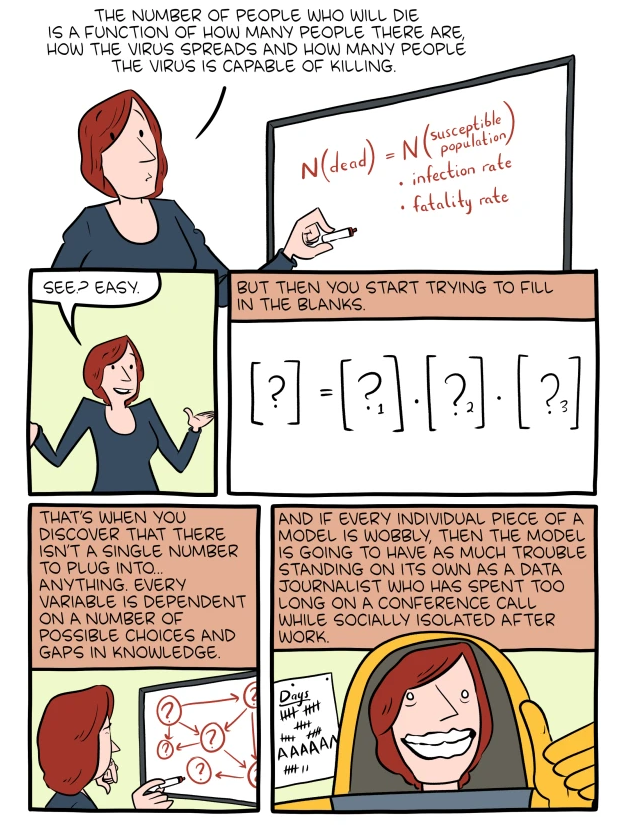
But I want to go back to the things that you don’t need a model to know. 19 children detained by the U.S. in a Chicago shelter for unaccompanied minors have tested positive for COVID-19. There are 300 cases of COVID-19 in Chicago’s Cook County Jail. Three people incarcerated there have died.
While models both influence policy and their variables are dependent on policy, there are stark realities right in front of us that those who have the space and mobility in this moment to feel like they have choices must choose how to respond. The parts of the present that feel ghastly are because of sick choices from the past.
Ok, a few media things that are not about a virus
This Bad Moves single has brought me a lot of joy, along with a playlist they compiled of other new music.
My friend Jenny made a lovely radio piece about a lovely poem that can feel like a game.
More COVID-19 dispatches
Fabricating masks
April 5, 2020
I made some of the masks in this video from UnityPoint Health in Cedar Rapids, Iowa. I used scrap fabric I had around, planning on inserting some kind of filter into my mask. This New York times article on mask materials was an accessible summary of which materials that (limited) research indicates works best for homemade masks.
I took the idea of reusing a produce twist tie to allow shaping the mask nose from this video. That video was interesting because it introduced me to PM 2.5 filters, which seem popular for people worried about air quality.
The CDC has a number of mask designs and instructions as well, that are a bit simpler.
The CDC says masks can be washed in the washing machine. A doctor told NPR that masks should be thought of like underwear and washed after each use.
Every map of Chicago is the same map
April 5, 2020
WBEZ reports “in Chicago, 61 of the 86 recorded deaths – or 70% – were black residents. Blacks make up 29% of Chicago’s population.”
On Friday, ProPublica reported “African Americans made up almost half of Milwaukee County’s 945 cases and 81% of its 27 deaths in a county whose population is 26% black.”
A great testing explainer
Both for work, and as someone living through this, I’ve been trying to understand how testing for the new coronavirus works. The inability for many people getting tested has many contributing factors, and the language of what constitutes a test “kit” is confusing. How Coronavirus Tests Actually Work (538) is an accessible explainer that is consistent with what I’ve learned from other sources over the last few weeks.
Explaining uncertainty
There is so much that researchers are still learning about the new coronavirus. While I think it’s comforting to have clear answers, it’s often more truthful, and useful to just break down the uncertainty. Every expert opinion you’ve heard about wearing masks is right (Quartz) does a good job of explaining why differing advice about whether or not the average person should wear a mask to help stop the spread of this virus is grounded in evidence.
COVID-19
I’ve been on self-quarantine since returning from the NICAR conference, where one attendee later tested presumptively positive for the new coronavirus.
One result of this is being able to do some maintenance on this website and I thought I’d use it to take some notes on information that stands out.
Fabric masks
I’ve seen a few guides on how to make fabric masks, and heard stories about how some hospitals requesting homemade masks, but this doc, Fabric Mask Best Practices, has the most detail I’ve seen and an appropriate amount of caveats.
A really good show
I’ve seen people organize online poetry readings and fashion shows, which is awesome, but it’s been hard to make some of these or it’s felt strange to enter an intimate space, even a virtual one, with strangers. Don Giovanni Records has organized an online fest, Going the Distance, and I am truly excited.
It starts at 1 p.m. on Monday, March 23 with the last set at 11:00 p.m.
Nasal swab
March 18, 2020 01:30 a.m.
If you’re curious about what a drive-through COVID-19 test looks like, this is it:
Roommates
March 18, 2020 01:20 a.m.
I live with roommates, and really have done so for most of my adult life. This resource offers reasonably simple ideas for reducing risk to people you live with.
Things to do
March 17, 2020 12:30 a.m.
Tonight I went to a restorative yoga class. It was over Zoom. It was harder to focus, lying on a mat in my room, which has become my office and dining room and still had the remnants of each scattered around me. Still, it felt nice to do something that was in real time, even if everyone was remote.
It seems like many people are trying to find ways to be social, even as we try to keep a healthy distance. I’ve seen dance parties, a calendar of livestreamed musical performances, meditation, origami instruction and people hanging out in colorful 3-D virtual worlds.
Coronoavirus and the incarcerated
March 15, 2020 7:35 p.m.
Coronavirus and Prisons: A Toxic Combination (The Marshall Project) is a good rundown of the dangers facing incarcerated people from this virus which include barriers to hand washing and bans on hand sanitizer.
In Illinois, activists are petitioning the governor to provide medical furloughs or compassionate release for elderly or infirm people in prison who would be at higher risk if infected.
There are already some changes that will impact those in the criminal justice system. The Chief Judge in Cook County, Illinois has postponed most court cases for 30 days. Many on probation do not need to meet in-person with their probation officers.
Simulating social distancing
March 15, 2020 4:30 p.m.
The Washington Post has published a great visual explainer showing how different strategies for limiting social interaction slow and limit (or fail to) the transmission of the disease. It’s important to understand that these visualizations are for a simulated infection, not the new coronavirus, but this was the first time I really understood what it looked like when infected people have broad contact with others.
I think part of that struggle is the disconnect between the present and the past and between here in the U.S. and other places.
A timeline of the United States’ slow response
March 15, 2020 4:30 p.m.
The March 11 episode of “The Daily”, Why the U.S. Wasn’t Ready for the Coronavirus, has an easy-to-understand timeline of the U.S.’ misteps in making testing available to the virus, from the president shutting down a White House office created to respond to global health crisis, the delays caused by the decision of the CDC to make its own test instead of using the WHO’s and prohibiting researchers in Washington State from using an existing infectious disease research program and their own test to understand the spread of the virus.
A wild information environment
March 15, 2020 2:45 p.m.
I’ve seen even journalists share later discredited information, or be imprecise about the takeaways from even credible news. For example, the Los Angeles Times reports that some people who testedvery positive for the virus and recovered from symptoms are once again testing positive for the virus. It’s easy to take away from this that people are getting reinfected, but a careful reading of the article shows that there are a number of reasons why someone might retest as positive.
As with everything about this virus, there’s still a lot that experts are learning.
The U.S. is testing more slowly than other countries
March 15, 2020 2:35 p.m.
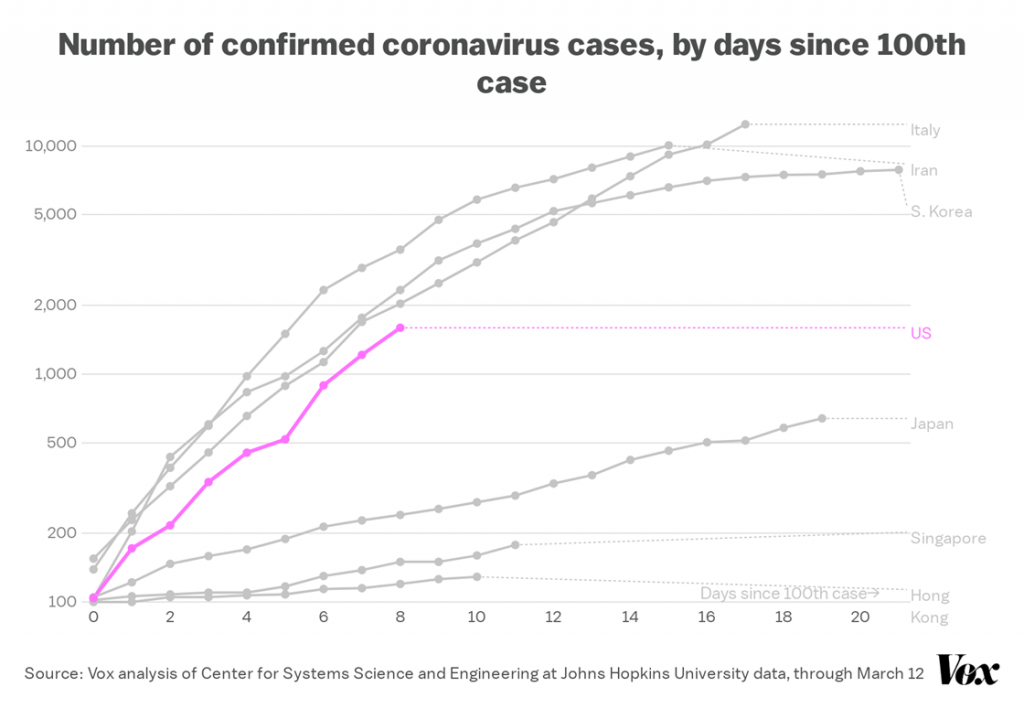
Rani Molla (Recode) made this chart and writes:
As of March 12, Americans had tested fewer than 10,000 people total when South Korea was testing that number of people in a day. Even Italy, where the coronavirus’s spread has forced the country to shut down, is testing people at a much higher rate than the US.
Source: VoxCare Newsletter, March 13, 2020
Setting environment variables in a Python virtualenv from a .env file
Lately, I’ve gotten into the practice of storing configuration in environment variables and keeping those in a .env file in the root of my project directory.
This file contains simple environment variable assignment and is used by Heroku and Docker.
However making sure these environment variables get set for any command being run in the development environment.
I often work in Python virtual environments, so putting the shell commands in the postactivate and postdeactivate scripts makes sense to me.
To set environment variables in postactivate:
#!/bin/bash
# This hook is sourced after this virtualenv is activated.
cd ~/workspace/scrape-represent-statements
set -a
source .env
set +a
To unset environment variables in postdeactivate:
#!/bin/bash
# This hook is sourced after this virtualenv is deactivated.
while read var; do unset $var; done < <(cat .env | grep -v '^\s*#' | sed  's/\s*\([^=]*\)=.*/\1/')
Music for early March
Eskorbuto
While in Mexico City, I went to “El Chopo”, a punk street market and got an Eskorbuto patch. It made me excited to listen to this band.
Smino – S!CK S!CK S!CK EP
Smino is a Chicago (via St. Louis) rapper performing March 2 as part of “The Come Up” series.
Watercolor Paintings – Red Scarf
My friend Mooj, who’s all over a bunch of cool radio/podcast projects made this music video.
Watercolor Paintings – Red Scarf from Zadie on Vimeo.
Muncie Girls – From Captain to Belsize
I read an article about this band that a friend shared on Facebook and they sounded really interesting.