As part of my work at the Center for Research Libraries, I am investigating different Constituent Resource Management (CRM) systems. One of the options is CiviCRM, a popular FLOSS CRM. As CRL is, in large part, a membership organization, I wanted to see if it was possible to represent the basic information that we keep about our member organizations in the CRM. I found that data entry through the web interface was pretty slow, so I wanted to experiment with CiviCRM’s contact import capabilities.
CiviCRM lets you define multiple, arbitrary relationships between contacts. This is how we can connect individual contacts with their institution (for instance the Librarian Councilor or Purchase Proposal Representative) or organizational sub-units (a particular library branch) with the parent organization.
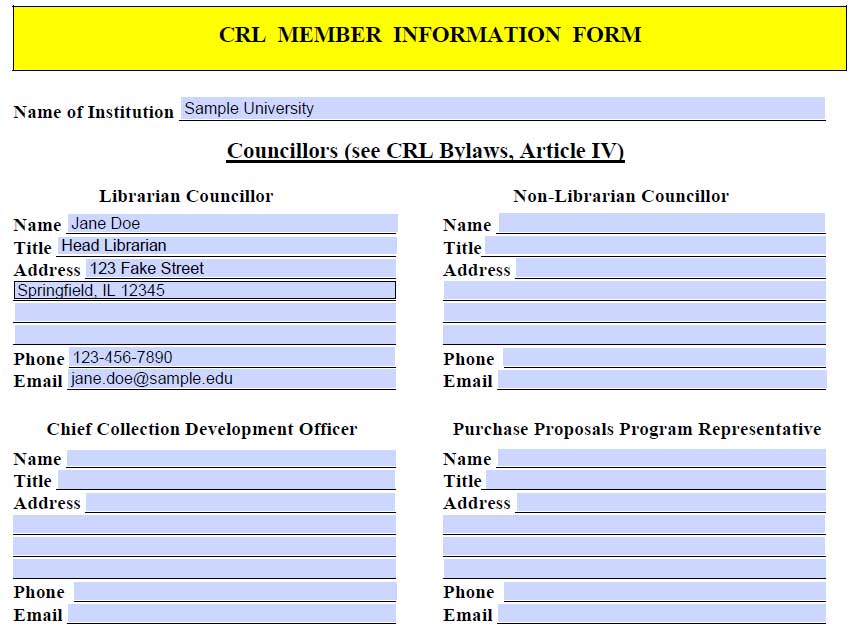
Here is an example of part of our paper member information form that shows that sort of information that we collect about a member institution:
CiviCRM also lets you import contact information and relationship information through comma separated value (CSV) files. However, there are a number of things that need to be configured in order to get this working properly.
Need to have contact types configured correctly for the relationship
This is configured at Administer > Options List > Relationship Types
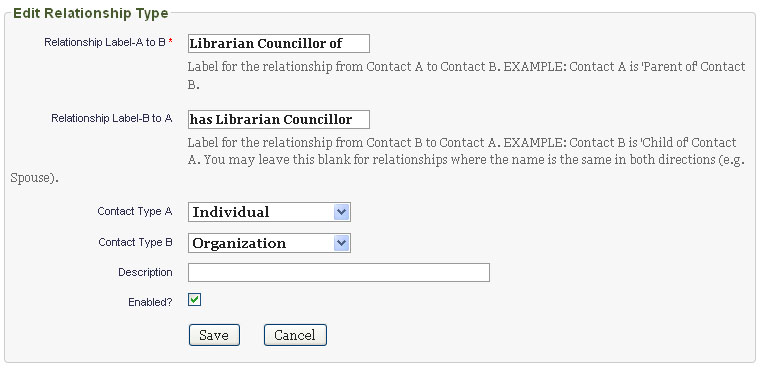
When you create a new relationship, it sets Contact Type A/Contact Type A to any contact type. This works fine if you are defining relationships within CiviCRM’s web interface, but doesn’t work well when importing contacts. This is because CiviCRM will not be able to correctly match the related contact if the contact type is not explicitly set.
In the case of our “Librarian Councillor of” relationship, Contact A is an Individual (the member organization librarian) and Contact B is an Organization (the member organization):
Need to update strict matching rules for individuals
CiviCRM has configurable matching criteria for identifying and merging existing duplicate contacts and for updated existing contacts based on import data. This feature is documented in the CiviCRM documentation page Find and Merge Duplicate Contacts.
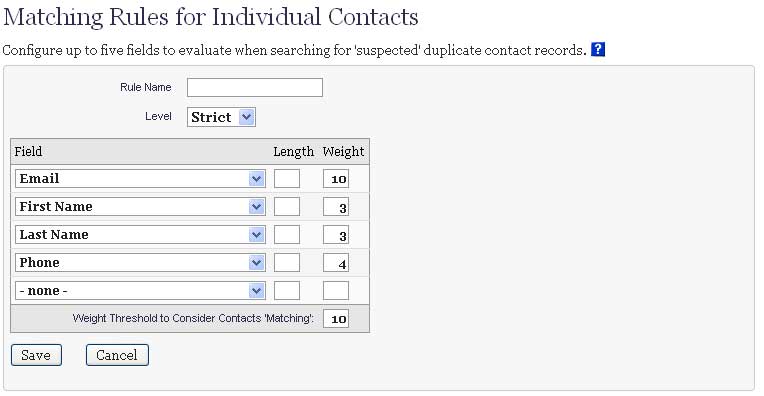
The matching criteria can be configured at Administer > Manage > Find and Merge Duplicate Contacts. By default CiviCRM defines Strict and Fuzzy rules for each contact type. CiviCRM uses the strict rule when importing contact data. However, the default rules might not fit the data that you have. For instance, by default, the strict rule for matching individuals puts all the weight on e-mail address. For many of the contacts, however, there is not an e-mail address. So, I had to update the Strict rule for Individual contacts to also match on First Name, Last Name, and Phone Number. Note that I set the weight so that all three values must match for CiviCRM to consider the contact a duplicate:
If you don’t configure these rules correctly, you will get duplicate entries when you try to import your contact relationships.
Need to only have one relationship per CSV import file
This is one of the most confusing aspects of the relationship import process. Initially, I tried to put all the relationships in the same CSV file that I used to import the individual contact:
First Name,Middle Name,Last Name,Job Title,Individual Prefix,Individual Suffix,Street Address,Supplemental Address 1,Supplemental Address 2,City,Postal Code Suffix,Postal Code,Address Name,County,State,Country,Phone,Email,Note(s),Employee Of, Librarian Councillor of
Jane,,Doe,Head Librarian,,,123 Fake St.,,,Springfield,,12345,,,Illinois,,123-456-7890,jane.doe@sample.edu,,Sample University, Sample University
That is, in the last 2 columns, I specify that the individual contact (Jane Doe) is an Employee of and the Librarian Councillor of Sample University.
This doesn’t work! I can only specify a single Individual -> Organization relationship in each CSV file. So, I need to break out the Librarian Councillor of relationship into a separate CSV file:
individual_import.csv:
First Name,Middle Name,Last Name,Job Title,Individual Prefix,Individual Suffix,Street Address,Supplemental Address 1,Supplemental Address 2,City,Postal Code Suffix,Postal Code,Address Name,County,State,Country,Phone,Email,Note(s),Employee Of
Jane,,Doe,Head Librarian,,,123 Fake St.,,,Springfield,,12345,,,Illinois,,123-456-7890,jane.doe@sample.edu,,Sample University
librarian_councillor_import.csv:
First Name,Middle Name,Last Name,E-mail,Phone,Librarian Councillor for
Jane,,Doe,jane.doe@sample.edu,,Sample University
I will first import the contact CSV (individual_import.csv), then the relationship CSV (librarian_councillor_import.csv).
Need to include fields in CSV so that matching rules will work
Note that in the above example, I have to be sure to include enough information for our matching rules that I defined before to match Jane Doe to her existing database entry. So, I need to have either an e-mail address or First Name, Last Name, and Phone number.
Need to tell import process how to handle duplicate contacts
When importing the relationships, we will already have imported the individual contact information. So, we just want to update the existing individual contact record to reflect their relationship with their organization. So, we need to set the For Duplicate Contacts option of the import settings to Update.
Need to set up relationship import field mappings correctly
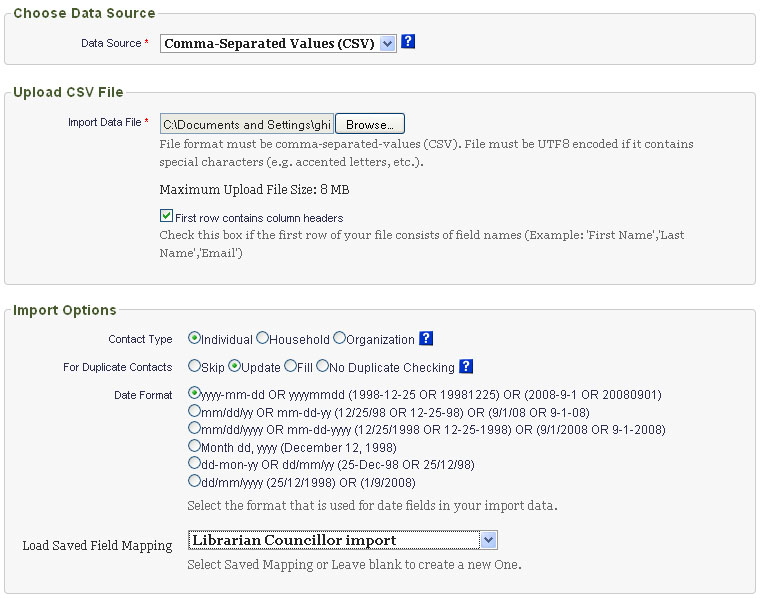
The field import mapping setting that I needed for the relationship import file (in this example librarian_councillor_import.csv) wasn’t immediately obvious to me. Here is a screenshot of the configuration that worked:
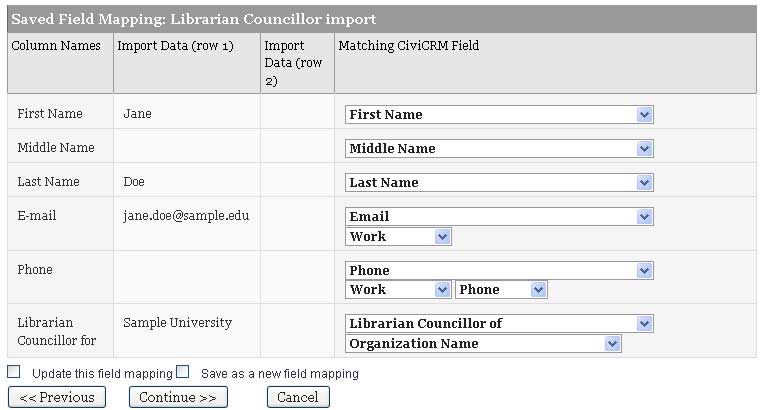
Note that the Librarian Councillor for field in the CSV if mapped to the Library Councillor of relationship (that I defined at Administer > Options List > Relationship Types) and that the option of this mapping is set to Organization Name so that it will try to relate the imported contact to the existing organization contact record with the name specified in the CSV file.
Summary
So, it is possible to import both individual and organizational contacts into CiviCRM as well as the relationships between them. However, this could be tedious because each relationship type must be imported in a separate file. One possible solution would be to have a master spreadsheet that is used to input contact and relationship data. Then the spreadsheet programs filters/macros could be used to export appropriate CSV files for importing the contacts and relationships into CiviCRM. The import process is still somewhat complicated, so it seems best to do have systems staff assist with an initial mass import and then have future contacts input manually through the web interface.