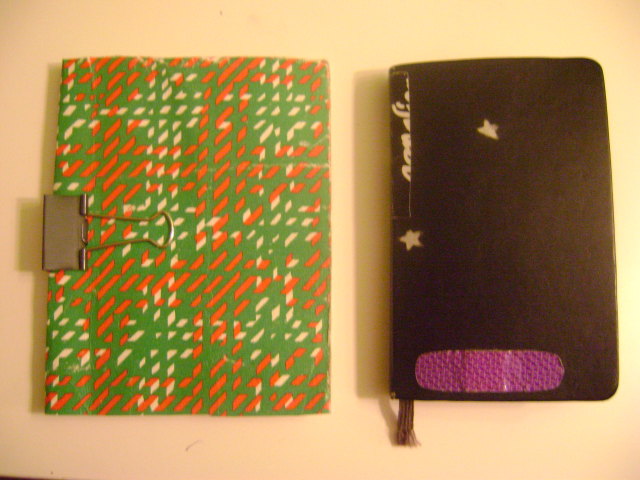
Update: Photos of my planner! Mine is on the left, next to a moleskin to give you an idea of the relative size. Below is what each day looks like.
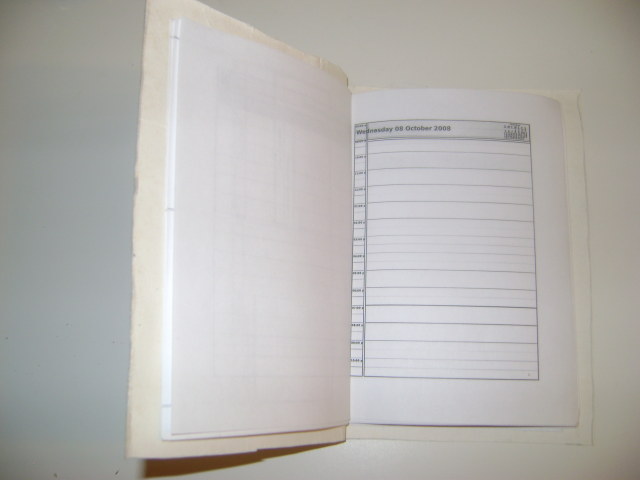
I use Sandy for most of my calendaring, but don’t have a PDA or mobile phone with a convenient calendar app (and can’t afford one). So, I needed a paper daily planner that could be generated on a weekly basis from the events that I shoot into Sandy. I find that it’s no too hard to do a daily paper->electronic sync to update my calendar in Sandy. Sandy has an ics export which is really nice if I want to view my appointments along with appointments from my other calendars (like my work one, managed by Webcalendar).
What you need:
- Calendar software that supports printing a daily view (I used KOrganizer)
- psutils package
Import your remote calendar(s)
I first imported my calendar into KOrganizer (File->Import->Import Calendar and then entered the URL of my iCal feed in the Location field) .
Print the calendar to a postscript file
I printed a page for each day of my calendar with File->Print and then chose Print Day for the Print Style. I selected a month worth of dates for the Date & Time Range. I clicked Print and chose the Print to File (Postscript) option for the printer Name. The ability to print to a file came with my default KDE setup, but it shouldn’t be too hard to get this ability from whatever printing management system you’re using.
Make the postscript file 4up
I used the psnup program to put four days on one letter sized page.
 ghing@silvertongue:~/tmp$ psnup -pletter -b0.25in -4 planner.ps planner-up.ps
The above options say that the output paper size is letter, that there should be a .25 inch margin around each page (I did this to allow for a binding on the left hand side of the sheets), that there should be 4 pages from the file planner.ps combined into every one page in the output file planner-up.ps.
Open the postscript file and print it
I used evince to open and print my planner.
Cut the pages into quarters
I used a paper cutter to cut the printed pages into quarters. Take care to keep track of the order of pages so it’s easier to assemble your calendar.
Find a cover and a binding
For mine, I used part of the cover of a notebook that I dumpstered in Bologna and held everything together with a butterfly clip that I got from the supply closet at work. Be resourceful!
 Â
 

